How much does a digital signature cost? Why tegolySIGN is the best choice.
The importance of digital signatures in today's business world has grown enormously because they offer many advantages. In particular, reducing paper is a key aspect, as digital signatures make the use of physical documents and handwritten signatures superfluous.
This not only saves costs but also conserves resources. One company that offers an effective solution for digital signatures is tegolySIGN. tegolySIGN enables users to sign documents digitally securely and with legal validity. This allows companies to save time and money. tegolySIGN also offers a user-friendly interface that allows even technically inexperienced users to use digital signatures without any problems. Furthermore, the solution ensures high security and confidentiality of the signed documents.

Definition: Digital Signature
The electronic signature based on asymmetric cryptographic algorithms is referred to as a digital signature. The private key is the only way to create the digital signature, while the public key can be used by anyone to verify it.
Costs of the digital signature
Cost analysis is important to assess the economic viability and profitability of implementing and using a digital signature. By identifying and evaluating all relevant costs, companies can make informed decisions about adopting the technology.
The total cost of implementing and using a digital signature consists of various components. Firstly, the costs include the acquisition costs for the corresponding software or platform. These can vary greatly depending on the provider and the scope of functions.
In addition, there are costs for installation, configuration, and integration of the software. This includes setting up the digital signature platform within the company's existing IT system. Additional resources such as IT personnel or external service providers may be required to perform these tasks.
Another important component of the cost analysis is employee training. In order to use the digital signature correctly and efficiently, employees must be trained. Training costs include the preparation and delivery of training sessions, as well as any training materials.
Furthermore, ongoing costs such as licence fees, technical support, and maintenance may also occur. These costs can vary depending on the provider and the agreed service level.
In addition to direct costs, there are also indirect costs that should be considered in the cost analysis. These include, for example, the time and resources required for transitioning and adapting processes and workflows to use the digital signature. Moreover, quality assurance measures may be required to ensure the integrity and authenticity of the digital signatures.
Costs Conclusion
It is important to focus on a lean and fast solution, as otherwise costs can escalate very quickly. That is why we have developed a solution that offers a collaborative user experience with MS Teams or Microsoft 365 access. This removes many security hurdles and integrates into your own company with very little effort. Costs such as installation and configuration are reduced to a minimum because the application is installed in 5 minutes. Training is always included with tegoly, or quickly self-explanatory due to the intuitive user experience. Employee onboarding is completed in a maximum of 15 minutes. Guaranteed!
Follow-up costs, such as maintenance or update fees, are also simple and transparent with us. They do not exist! A true SaaS solution indeed.
Savings potential of the digital signature
The cost analysis should also consider potential savings that can be achieved by using digital signatures. These include, for example, savings on paper and printing costs, postage, storage, and archiving of documents, as well as time saved when processing contracts and other documents.
By identifying and evaluating all these cost factors, companies can realistically estimate the total costs of implementing and using a digital signature and make an informed decision.
Here you can find our ROI (Return on Investment) calculator, which shows you exactly your savings potential with the digital signature from tegolySIGN.
Scanned signature versus electronic signature: Costs and legal validity
The scanned signature
Through a digitisation process (or scan), a handwritten signature on a paper document is digitised and converted into an image (.jpg, .doc, .pdf etc.).
There are several reasons why a scanned signature is not legally valid:
The signatory cannot be identified
It cannot be proven who signed the document or whether it was subsequently manipulated
How secure is the scanned signature?
In terms of security, this means that it can be easily forged.
Anyone can digitally copy your scanned signature, which for example is placed on a PDF document (#SnippingTool). It is obvious that this is not legal. In court, scanned signatures therefore have no evidential value, as a scanned signature is viewed as a copy and not as an authentic signature!
Therefore, it is not legally valid, particularly for contract processes in companies.
The digital signature
The digital signature is a technical and legal process that allows individuals to express their agreement and acceptance of documents. Electronic signatures are legally binding, regulated by the European eIDAS regulation, and implemented in German law through the Trust Services Act (Vertrauensdienstegesetz).
This means that a signature in electronic form holds validity in legal disputes, because it enables the following points:
Identification or authentication of the signatory
Creation of a log, which serves as proof of the signature
Ensuring the integrity of the document and the signature
What levels of signatures are there?
The eIDAS regulation defines three levels of signatures:
simple electronic signature
advanced electronic signature
qualified electronic signature
They differ by their respective security levels and the "less strict" validation steps regarding the signatory's identity in the first case.
(The simple electronic signature is the most commonly used signature. It offers a sufficient level of security to be able to sign the majority of documents.)
Please read our article on the three levels of e-signature.
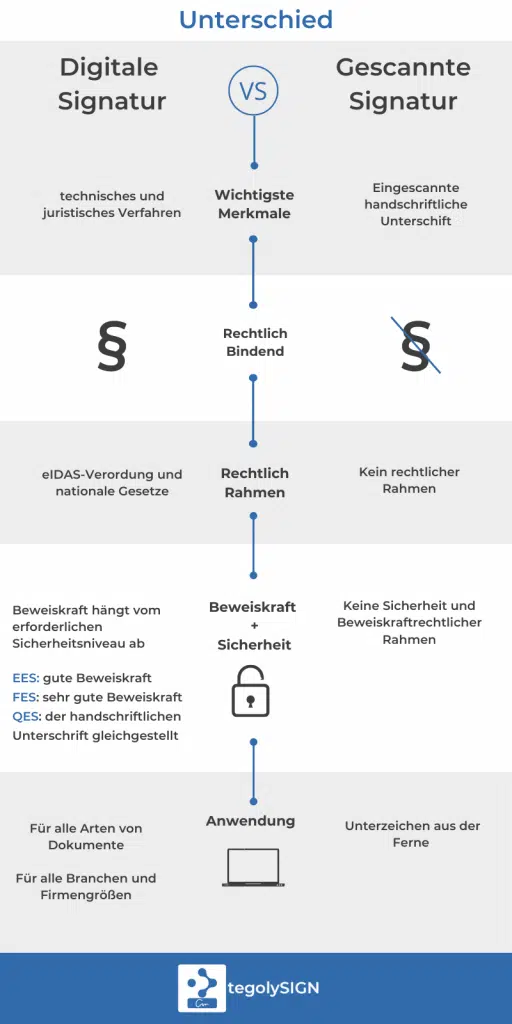
In the infographic we summarise the most important differences
Costs conclusion on scanned signatures
The scanned signature is the most cost-effective solution. It is easy to implement, simple to copy, and can be inserted into any document. Unfortunately, this type of signature is not legally valid. In a legal dispute in court, it will not hold up.
Security: A scanned signature carries the risk of abuse. Because it is easy to copy and paste into documents, third parties can use it for fraudulent purposes without major hurdles. The lack of unique security features, such as those present in digital signatures, makes them vulnerable to forgery. Anyone with access to such a signature could potentially use it in another context without the owner of the signature knowing about it.
Legal Validity: The jurisprudence of many countries does not recognise the scanned signature as legally valid. This means that documents bearing such a signature do not have the same status in a legal dispute as those with a handwritten or digitally signed signature. Without a confirming authenticity, it can be considered invalid in legal disputes.
Using a scanned signature may be practical and cost-effective in some situations, but it is essential to consider the associated security risks and legal limitations. For important documents or contracts, it is recommended to use more secure and legally recognised signing methods.
Costs for different levels of digital signature
Since there are three levels of digital signature and many different providers with very different pricing models, a direct comparison is very difficult. In the table, you will find a rough overview of the costs incurred per signature.
per signature | Simple electronic signature | Advanced electronic signature | Qualified electronic signature |
|---|---|---|---|
2-Factor authentication | - | €0.50 | - |
Hardware | - | - | Dependent on provider |
Identification | - | - | €7 – €13 depending on method |
Signature costs | - | - | approx. €1.50 |
Total per signature | €0 | €0.50 | up to €14.50 |
The Five Best Tips for Cost Optimisation
Tip 1: Efficient use of the digital signature solution
Since approx. 90% of all documents in the EU may be signed with the "Simple Electronic Signature" SES, this is the most cost-effective and, at the same time, legally secure solution. The remaining 10% of documents can be signed with the Advanced and Qualified signature.
Tip 2: Choose scalable plans and pricing structures
When choosing a provider, it is important to ensure that the signature solution is easy to expand or flexibly adapt to corporate requirements. Here, you should pay attention to the uncomplicated use of AES and QES. You should also consider the scalability of licences and features and be able to choose according to your needs.
Tip 3: Consider training and support costs
The pure purchase costs are only part of the expenses. You should always also keep training and support costs in mind. Depending on the provider, annual maintenance and one-off onboarding costs may apply. These are often not insignificant and should not be charged extra in a SaaS solution.
Tip 4: Maximize integration with existing systems
By integrating tegolySIGN into Microsoft Teams, companies benefit from a seamless working environment. Employees can sign documents directly in the platform where they already communicate and collaborate. This eliminates the need to switch back and forth between different applications, which saves time and minimises the risk of errors.
The benefits of this integration are clear:
Simplicity and speed: Contracts, reports, and other documents can be sent and received for signature directly from Teams.
Real-time collaboration: Team members can follow the progress of document release and signing live and act immediately.
Mobility: Regardless of location, employees can access and sign documents, which is particularly advantageous in an increasingly mobile working world.
The integration into DATEV, the leading software system for tax consultants in Germany, opens up an easy way for users to send documents for signature directly from DATEV and receive them back there after the workflow is finished. This represents a significant simplification of daily work:
Optimised workflow: Invoices, annual financial statements, and other tax-related documents can be sent directly from the DATEV system for digital signature.
Data Security: Thanks to tegolySIGN's secure cloud storage in Germany and eIDAS and GDPR compliance, all processed documents are not only secure but also legally protected.
Centralised Document Management: All signed documents can be archived directly in DATEV, ensuring central and organised access.
The integration of tegolySIGN into Microsoft Teams and DATEV is therefore not only an added value in terms of digitisation, but also a decisive advantage in daily business operations. It is a solution that enables companies to work more efficiently and securely while ensuring compliance at the same time.
Tip 5: Perform long-term cost-benefit analysis
A long-term cost-benefit analysis (CBA) helps organisations objectively evaluate investments and projects to make informed decisions. The CBA considers both quantitative and qualitative aspects and aims to determine the benefits of a project or investment in relation to the associated costs.
Pay special attention here to the follow-up costs for e.g. signatures (AES, QES), annual update costs, or support. These can vary greatly depending on the provider. As tegolySIGN, we provide a SaaS solution with our clear and low-cost pricing model that amortises after just one signature per month. With our ROI calculator, you can calculate your saving potential very precisely.
What does a manual / analogue signature process cost?
The costs of a manual or analogue signature process can vary, depending on various factors such as the number of documents to be signed, the effort required for document management and archiving, and the human resources needed to carry out the process.
Direct costs include paper, printing, and postage costs for the documents, as well as costs for storing and archiving the signed documents. In addition, indirect costs such as working time for printing, filling out, signing, and forwarding the documents, as well as for the manual entry of information, may arise.
The manual process is very complex and time-consuming, as can be seen from the subsequent work steps. Also, a lot of time can pass before a document is completely signed, not to mention that it can also get lost.
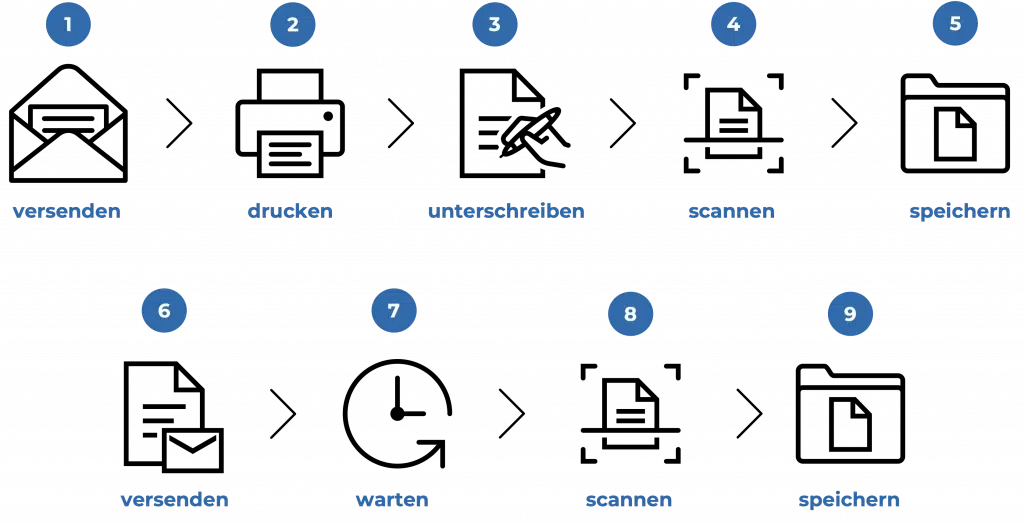
(Exemplary process)
The costs for an analogue signature process are shown here as an example. In our example, we assume 1,200 documents that require a processing time of approx. 12 minutes (approx. 240 hours total). Here, the costs consist of labor costs (approx. €20 hourly rate), printing, paper, scanning, envelope, and postage, as well as whether there are multiple signers of a document. Costs such as procurement, storage, and disposal are not taken into account here. Therefore, they would need to be added at approximately 15-20%.
This means that starting from just two signed documents per licence, the use of tegolySIGN pays off, also from a cost perspective.
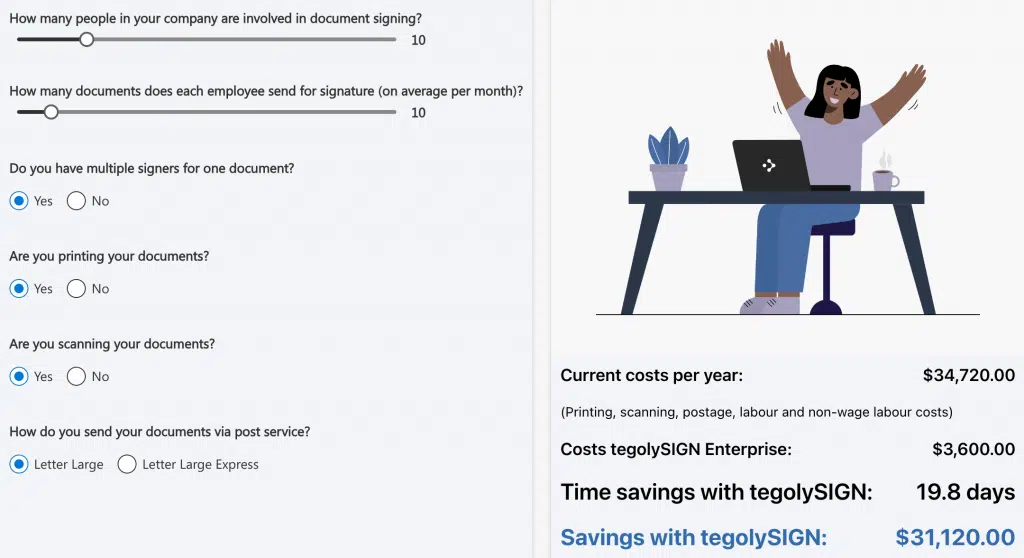
tegolySIGN offers enormous savings to users who have a larger volume of signatures. The potential here is huge, and the investment amortises in a very short time.
Comparison of Costs: tegolySIGN vs. Competitors
Header 1 | tegolySIGN | DocuSign | Adobe Sign |
|---|---|---|---|
Licence fee per month/user | €12 – €36 | €33 – €62 | €47 – €61 |
Onboarding | included | on request | on request |
Maintenance/Telephone support | included | Surcharge | Surcharge |
SES | unlimited | 100 documents per licence | 150 documents per licence |
AES | €0.50 starting from the 11th AES (10 per user/month included) | Surcharge (only in Business Pro) | Surcharge (on request) |
QES | Pay as you go (coming soon) | Surcharge (on request) | Surcharge (on request) |
Our solution stands out for a range of unique features and value-adds that differentiate it from other options available on the market. Check out the features of tegolySIGN here.
First of all, we offer a highly personalisable platform. Our customers can select various modules and functions and adapt them individually to their specific requirements. This gives them a bespoke solution tailored perfectly to their needs.
Another added value of our solution is the seamless integration into Microsoft Teams, and with our Power Automate Connector, external applications can easily be connected to ensure a smooth document workflow.
Furthermore, we offer outstanding customer service. Our expert team is always available to assist our clients with questions, problems, or customisations. We understand the importance of reliable and fast support and ensure that our clients always receive the best possible care.
Finally, we offer a transparent pricing structure. Our prices are fair and transparent, with no hidden costs or fees. We offer flexible payment models that allow our clients to align their expenses with their individual requirements.
Overall, our solution offers unique features and added value that support our clients in optimising their business. From personalisation and AI integration to excellent customer service and a transparent pricing structure – we guarantee that our solution meets the needs of our clients and gives them a real competitive advantage.
Conclusion
Digital transformation has decisively changed the way companies work today. The necessity of digital signatures is clearly visible, and it offers not only efficiency and sustainability but also legal validity. While scanned signatures have security gaps and are legally challengeable, digital signature solutions like tegolySIGN guarantee legal validity and security.
In view of the rapid implementation, minimal training effort, and lack of follow-up costs, tegolySIGN is clearly the right choice for companies looking for an effective and secure digital signature solution. Don't hesitate! Take advantage of tegolySIGN and take the first step towards a secure and efficient digital working environment.
Start your free trial today and choose tegolySIGN. It's time to leave the paperwork behind and fully embrace the digital revolution.
Is a scanned signature legally valid?
No, a scanned signature is not legally valid in many countries. In a legal dispute, it will not have the same status as a digital signature.
What are the hidden costs of a manual signature process?
Hidden costs include working time for printing, filling out, and forwarding documents, as well as costs for storage and archiving.
How do the costs differ for different levels of digital signature?
There are three levels of digital signature: Simple Electronic Signature, Advanced Electronic Signature, and Qualified Electronic Signature. Costs vary depending on the level and can range from €0 to up to €14.50 per signature.
How does the use of a digital signature solution like tegolySIGN pay off?
For companies with a high volume of documents to be signed, the cost savings can be significant by eliminating manual processes and efficiently using digital signatures. The investment in such a solution can amortise in a short time.
Are there any hidden costs with tegolySIGN?
No, tegolySIGN offers a transparent pricing structure with no hidden costs or fees.